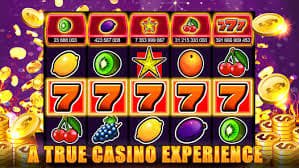
Download the Gbajaa app and play slots, betting, fish games, and thousands more — anytime, anywhere. Installation takes just a few minutes and getting started is easier than ever.
Download Gbajaa on any device — Android or iOS — and enjoy the best gaming experience.
Download the Gbajaa Android app directly as an APK file. No Google Play Store required.
Download the Gbajaa app for iPhone and iPad. Built to meet Apple's highest security standards.
Download and install Gbajaa in just a few simple steps.
For Android
Visit the Gbajaa download page and tap the Android button. The APK file will begin downloading immediately.
Go to Settings → Security → Unknown Sources or Install Unknown Apps and enable it. This is a standard device setting.
Tap the Gbajaa APK file in your Downloads folder, then tap Install.
Once installation is complete, tap the Gbajaa icon on your home screen. Log in to your existing account or register a new one.
For iOS
Open the Gbajaa download page in Safari on your iPhone or iPad and tap the iOS link.
Follow the on-screen instructions to install the profile. Go to Settings → General → VPN & Device Management and tap Trust.
The Gbajaa icon will appear on your home screen. Installation is complete — the entire process takes under 2 minutes.
After your first login, set up Face ID or Touch ID. From then on, a single touch is all it takes to sign in.
Downloading the Gbajaa app gives you a significantly better experience than playing in a browser.
Built on native code, the Gbajaa app loads up to 3x faster than a mobile browser. Smooth gameplay is guaranteed even on a 3G network.
New bonus offers, free spins, jackpot wins — all updates delivered straight to your phone. Never miss an opportunity.
Log in instantly with your fingerprint or face. No more typing your password every time.
The Gbajaa app is power-optimized. It uses less than half the battery you would drain playing the same games in a browser.
Dark mode is available for night or low-light gaming. The theme switches automatically to keep things easy on your eyes.
The Gbajaa app notifies you automatically when an update is available. Install the latest version in a single tap.
Mobile gaming is growing fast in Bangladesh. Whether at home or on the go, people are turning to their smartphones for entertainment. Gbajaa built its mobile app with exactly that in mind. Download it and you will quickly see why it has become so popular, so fast.
Many people assume a mobile browser is enough and wonder why they would bother downloading a separate app. One session with the Gbajaa app will put that question to rest. Browsers are slow to load games, pages reload unexpectedly, and notifications never come through. The app has none of those issues — everything runs so smoothly it feels like you're on a high-end gaming device.
This is a valid concern, and Gbajaa takes it seriously. Every Gbajaa APK release is thoroughly vetted by third-party security experts before it goes live. The file contains no viruses, malware, spyware, or harmful code. All data transmission is protected by 256-bit SSL encryption.
One important note — always download the APK exclusively from Gbajaa's official download page. APK files from third-party websites or unofficial sources can be dangerous. Official Gbajaa files always carry a verifiable digital signature.
Many users wonder how much mobile data gaming actually uses. The Gbajaa app includes a smart Data Saver mode that reduces data usage by up to 40% by slightly lowering graphics quality — without taking any of the fun out of the game, just cutting down your data bill.
Playing slots on the Gbajaa app for one hour typically uses around 30–50 MB of data. Live Casino games may use a bit more. On Wi-Fi, there is nothing to worry about — enjoy the full graphics experience.
Gbajaa releases new updates every month, bringing new games, improved performance, new payment options, and security enhancements. If you see an update notification when opening the app, go ahead and update to get all the latest features at once. The app will still work without updating, but some new games or features may not be available.
One Gbajaa account works across your Android phone, iOS phone, tablet, and the website. Your balance, gaming history, and bonuses stay in sync across all devices. Start a game on your tablet at home and pick up right where you left off on your phone when you're out.
Use a Wi-Fi connection for faster downloads. Make sure your phone has enough storage space before downloading. If you have an older version installed, you can install the new APK directly over it — no need to uninstall first.
Only download from Gbajaa's official page. Avoid using files downloaded from third-party sites. This is important for the security of your personal information and account.

Minimum requirements for both Android and iOS:
If you run into any issues downloading or installing, our support team is available 24/7 to help.
Live Chat: 24/7
See how much more the Gbajaa app offers compared to a mobile browser.
| Features | Gbajaa App | Mobile Browser |
|---|---|---|
| Loading Speed | ✓ 3x Faster | Moderate |
| Push Notifications | ✓ Yes | ✗ None |
| Biometric Login | ✓ Yes | ✗ None |
| Data Saver Mode | ✓ Yes | ✗ None |
| Offline Demo | ✓ Yes | ✗ None |
| Battery Usage | ✓ Lower | High |
| Automatic Updates | ✓ Yes | ✗ None |
| Screen Optimization | ✓ Perfect | Partial |
| Dark Mode | ✓ Yes | ✗ None |
Answers to common questions about downloading Gbajaa.
The Gbajaa app is strictly for users aged 18 and above. Gaming is a form of entertainment. Play within your set budget and avoid chasing losses with larger bets. For more information, visit our Responsible Gaming View page.